9 min read
Bilingual Website Design UAE: Arabic and English Done Right
Bilingual website design in the UAE, explained for startups: when you need Arabic, the RTL rules to get right, SEO setup, and a free 12-point checklist.
Your customers in Dubai switch between Arabic and English all day, but most "bilingual" startup websites are English pages with a machine-translated copy bolted on. That half-built Arabic version quietly costs you trust with the exact people you want to win.
This guide covers bilingual website design in the UAE the way I'd explain it to a founder over coffee: when you really need Arabic, how to plan for it without doubling your budget, and the RTL details that separate a real Arabic site from a flipped English one.
The short answer
Bilingual website design in the UAE means building one site that works fully in English (left to right) and Arabic (right to left), with separate URLs per language, native-quality Arabic copy, Arabic-specific typography, and a layout that mirrors correctly. Most early-stage startups should launch on an "Arabic-ready" build, then add Arabic to their highest-value pages first.
Do you actually need an Arabic website in the UAE?
Not always on day one. The real answer depends on who's buying from you.
Arabic is the UAE's official language, but in my experience a lot of tech and B2B buying in Dubai happens in English. So instead of a blanket rule, look at your customer:
- **Go bilingual at launch** if you sell to consumers, work with government entities, or target Emirati and wider GCC families. Healthcare, education, real estate, F&B, and consumer fintech usually fall here.
- **Launch English-first** if you're a B2B SaaS or services startup selling to international or expat-led teams. Plan Arabic as phase two.
- **Check your inbox.** If leads are already messaging you in Arabic on WhatsApp or Instagram, that's your signal.
There's a legal angle too. Under the UAE's consumer protection law, most information given to consumers, like product details, bills, and warranty terms, has to be in Arabic, with other languages allowed alongside it, according to this summary from law firm CMS. If you sell to consumers, check with your legal advisor before launching an English-only store.
Arabic-ready: go bilingual without doubling your budget
Here's my honest take after 7 years of designing products: the expensive mistake isn't skipping Arabic. It's building an English site that can't take Arabic later, then paying to rebuild it.
An Arabic-ready build costs a little more thinking upfront and saves you a redesign. It works in three phases.
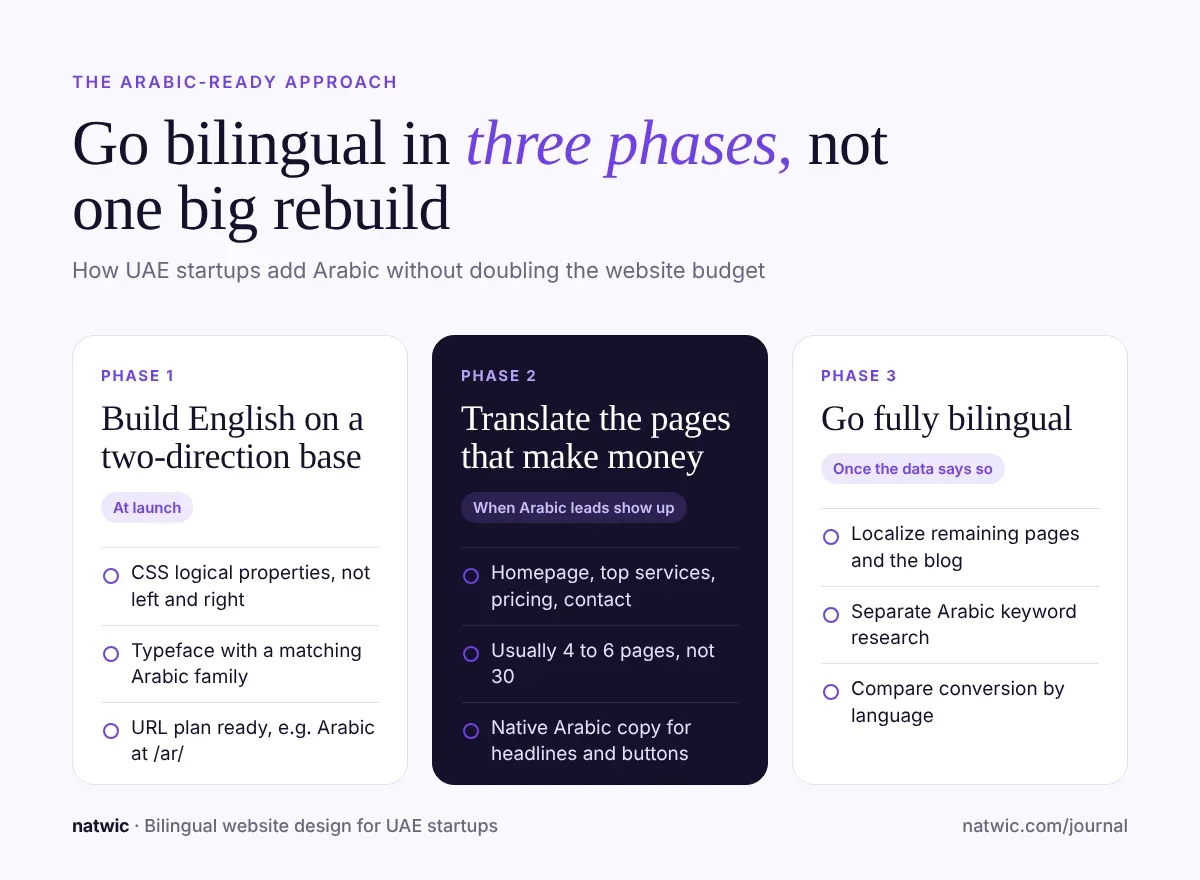
Phase 1: Build English on a two-direction foundation
Use CSS logical properties like `margin-inline-start` instead of `margin-left` so one stylesheet works in both directions. Pick a typeface that has a matching Arabic family. Decide your URL plan now, for example English at the root and Arabic at /ar/.
You're not translating anything yet. You're just not painting yourself into a corner.
Phase 2: Translate the pages that make money
Homepage, your top service or product pages, pricing, and contact. For most startups that's 4 to 6 pages, not 30. The blog can wait.
For a rough idea of what Arabic adds to the bill, we broke down translation and font costs in our startup website cost guide for Dubai.
Phase 3: Go fully bilingual
Localize the remaining pages, run proper Arabic keyword research, and start publishing Arabic content. By now your analytics show how each language converts, so you're investing based on real numbers instead of guesses.
What bilingual website design really involves
Adding `dir="rtl"` flips your text. It doesn't make your site Arabic. RTL is a full layout system that touches navigation, icons, forms, sliders, and tables.
Mirror the layout, not everything
In Arabic, the whole reading path runs right to left. The logo and menu start on the right, "next" arrows point left, and progress bars fill from the right. But some things should never flip, and getting this wrong is the fastest way to look like a translated template.
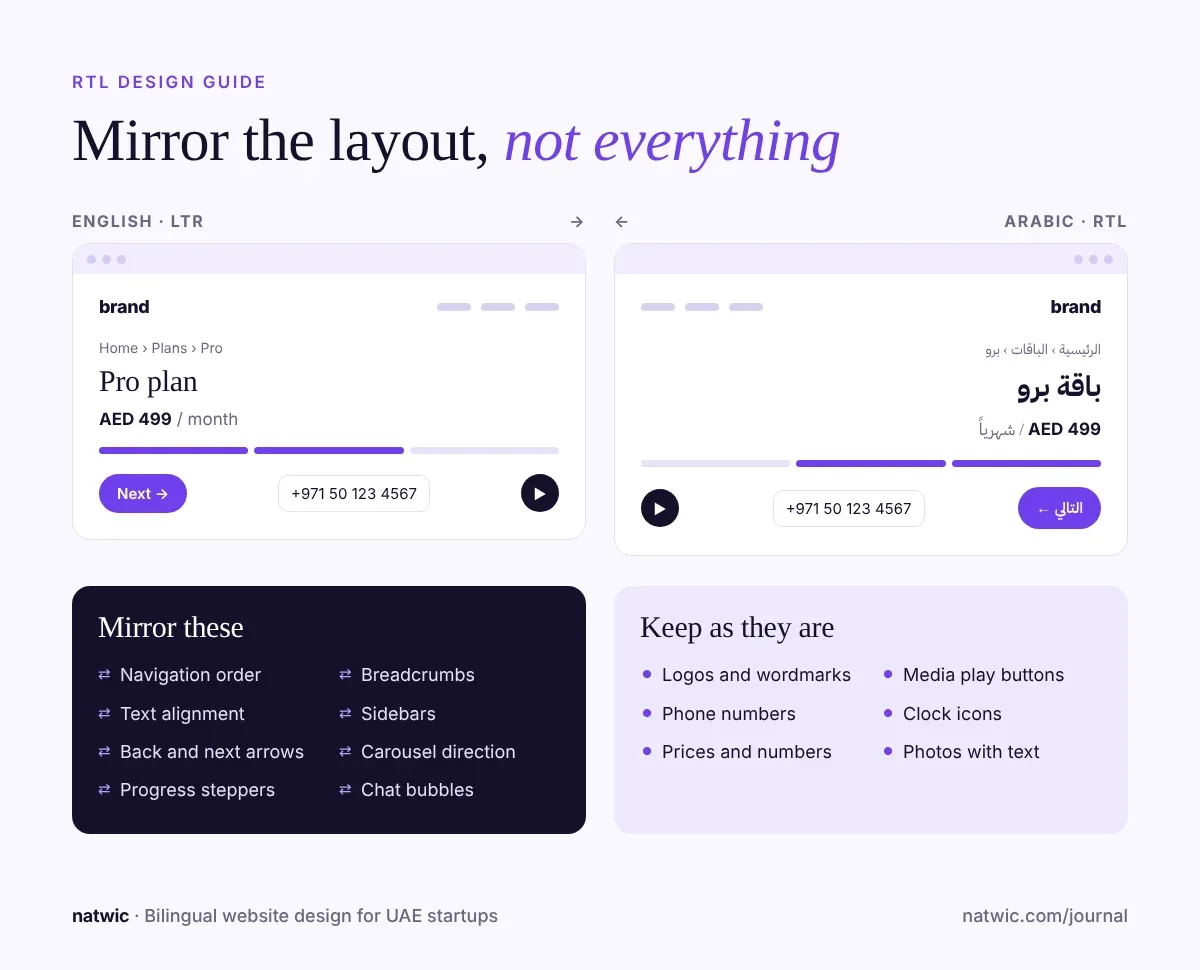
**Mirror these:** navigation order, text alignment, back and next arrows, progress bars and steppers, sidebars, breadcrumbs, carousel direction, and chat bubbles.
**Keep these as they are:** logos and wordmarks, phone numbers, prices and other numbers, media play buttons, clock icons, and product photos with text in them.
Give Arabic its own typography rules
Arabic letters connect, carry dots and marks above and below the line, and tend to look smaller than Latin text at the same font size. A few rules that save you pain:
- Start Arabic body text slightly larger than English and give it more line height, then test on real phones.
- Never add letter spacing to Arabic. It breaks the visual flow of connected letters.
- Skip italics. Arabic doesn't use slanted emphasis the way English does, so use weight or color instead.
- Pair fonts on purpose. IBM Plex Sans Arabic, Noto Kufi Arabic, Cairo, and Tajawal are all free on Google Fonts. If your brand uses a paid Latin typeface, check whether it has an Arabic companion before you commit.
Write the Arabic, don't just translate it
Machine translation gives you Arabic that's technically correct and sounds nothing like your brand. Native speakers notice in the first sentence. At minimum, have a native Arabic copywriter write or edit your headlines, buttons, and pricing page.
Google also warns against pages where only the menus are translated while the main content stays in one language, since it makes the page's language unclear (Google Search Central).
Sweat the small details
- **Phone and email fields** stay left to right, even inside an Arabic form. A +971 number should never render backwards.
- **Digits:** choose Western digits (0 to 9) or Eastern Arabic digits and stay consistent across the site.
- **Mixed text:** English brand names inside Arabic sentences can scramble punctuation. Test with real copy, never lorem ipsum.
- **Language switcher:** one click, visible on every page, labeled in the target language ("العربية", not "Arabic"), and it should open the same page in the other language, not dump people on the homepage.
Bilingual SEO basics most founders skip
A bilingual site only helps you rank in both languages if Google can tell the versions apart. Four basics cover most of it:
- **Give each language its own URL.** Google recommends different URLs for each language version instead of swapping content with cookies or browser settings. Subfolders like /ar/ are the simplest setup for a startup.
- **Add hreflang tags with return links.** Each page should list itself and its translation. If your Arabic page points to the English one but the English page doesn't point back, Google may ignore the tags.
- **Don't auto-redirect by location or browser language.** Google advises against it because it can block users and crawlers from reaching every version. Let people choose.
- **Research Arabic keywords separately.** People don't search in Arabic using word-for-word translations of English phrases, so a translated keyword list misses real demand.
Choosing a platform for an Arabic English website
Your platform decides how painful Arabic will be. Here's how the common options compare for startups:
| Platform | Arabic and RTL support | Best for | Watch out for |
| Webflow with Localization | Applies `dir="rtl"` automatically to RTL locales, with per-locale style overrides | Marketing sites that need to launch fast | Localization is a paid add-on, from $9 a month per site on top of your site plan |
| Next.js (custom code) | Full control over routing, direction, and fonts | Startups with a product and site built together | Every content change needs a developer unless you add a CMS |
| WordPress with a multilingual plugin | Mature plugins and many RTL-ready themes | Content-heavy sites and blogs | Theme quality varies a lot, and plenty of themes break in RTL |
Webflow's own localization guide confirms the automatic RTL direction and recommends logical properties for layouts.
This is how we approach builds at Natwic: we design and build startup sites in Webflow or Next.js and set up the two-direction foundation from the first wireframe, even when Arabic is months away.
Free bilingual launch checklist
Before your Arabic version goes live, run through these 12 checks.
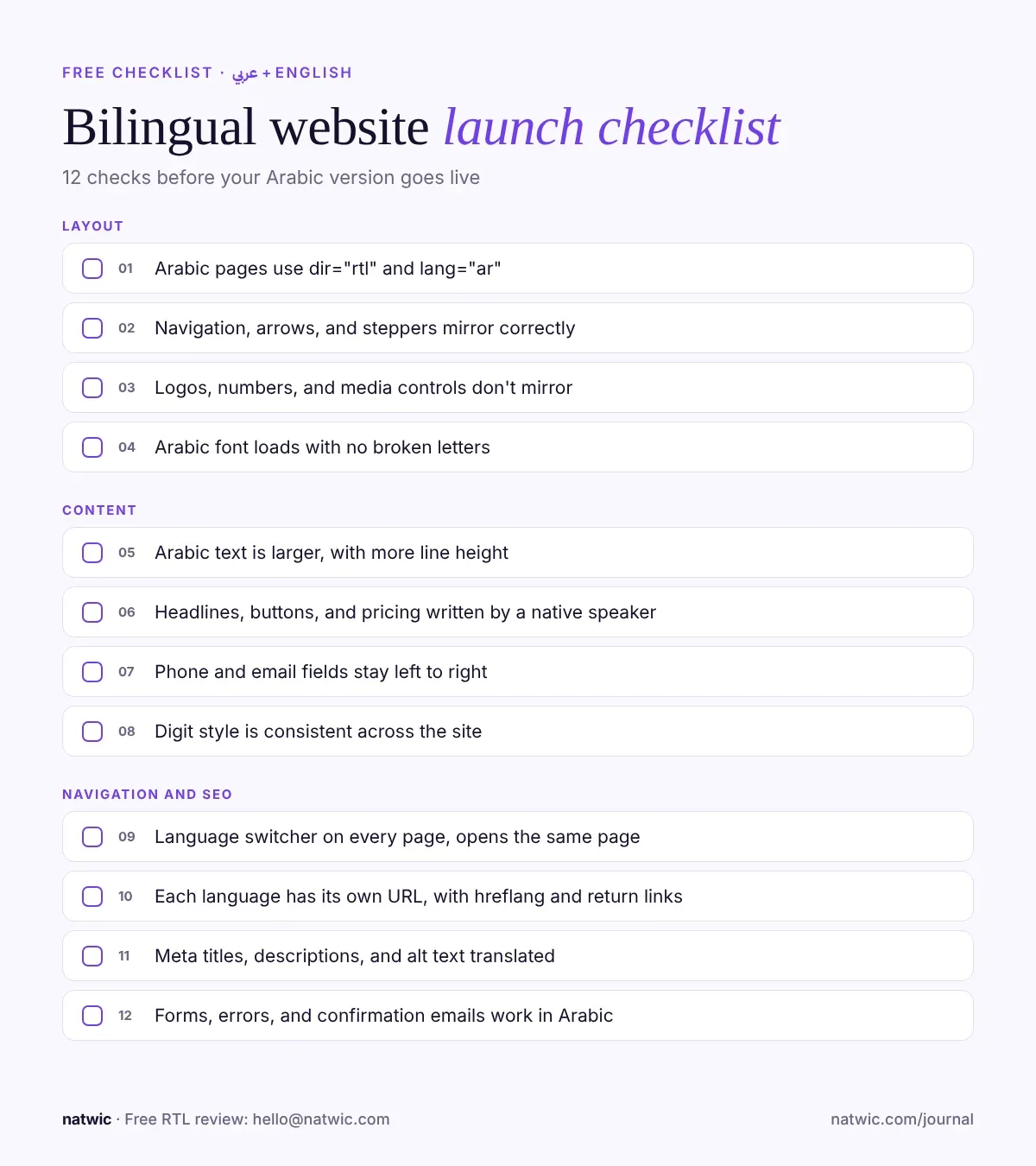
- Arabic pages use `dir="rtl"` and `lang="ar"` on the page.
- Navigation, arrows, and steppers mirror correctly.
- Logos, numbers, and media controls don't mirror.
- Arabic font is loaded, with no fallback boxes or broken letters.
- Arabic text is larger and has more line height than English.
- Headlines, buttons, and pricing are written or edited by a native speaker.
- Phone and email fields stay left to right.
- Digit style is consistent across the site.
- Language switcher is visible on every page and opens the same page.
- Each language has its own URL with hreflang and return links.
- Meta titles, descriptions, and alt text are translated.
- Forms, error messages, and confirmation emails work in Arabic.
Want a second pair of eyes? Email your site link to hello@natwic.com with "Arabic check" in the subject line, and I'll send back a free RTL review with the top fixes for your site.
FAQ
Do I need an Arabic version of my website in the UAE?
It depends on your customers. Consumer brands, government-facing businesses, and anyone targeting Emirati or GCC audiences should launch bilingual, and consumer protection rules require most consumer information in Arabic. B2B startups selling to international teams can usually launch in English first, as long as the build is ready for Arabic.
How much does it cost to add Arabic to a website in Dubai?
Translation for a 10-page site typically runs around AED 1,500 to 3,000, and licensed Arabic fonts can add AED 2,000 to 10,000 if you don't use a free family. The bigger cost is a site that wasn't built for RTL, because fixing that can mean a partial rebuild. Our startup website cost guide has the full breakdown.
Should Arabic and English be on separate domains?
For most startups, no. A single domain with language subfolders like /en/ and /ar/ is easier to manage and keeps all your SEO authority in one place. Google supports subfolders, subdomains, and separate domains, but subfolders are the lowest-maintenance option.
Can I use Google Translate for my Arabic website?
You can use it for a first draft, but don't publish it as is. Machine-translated Arabic often reads stiff and off-brand, and native speakers spot it instantly. Have a native Arabic writer edit at least your key pages.
What is the best Arabic font for a website?
There's no single best, but IBM Plex Sans Arabic, Noto Kufi Arabic, Cairo, and Tajawal are reliable free options on Google Fonts. Pick one whose weight and personality match your English typeface, then test it at small sizes on mobile.
Does Webflow support Arabic and RTL?
Yes. With Webflow Localization, RTL locales get `dir="rtl"` applied automatically, and you can override styles per locale for things like fonts and spacing. You still need to check every layout, since components built with left and right spacing won't flip on their own.
Getting your bilingual website right
Bilingual website design in the UAE isn't about translating more pages. It's about building a site that respects how Arabic speakers read, then adding Arabic where it actually moves revenue.
If you're planning an Arabic English website, or you have one that doesn't feel right in Arabic, tell us what you're building at natwic.com/contact or email hello@natwic.com. We'll help you map out an Arabic-ready plan that fits your launch date and your budget.
Related services
Need a hand with this?
Related posts
More from the journal.
Want us to build something like this for you?
Start a project→