8 min read
Webflow vs Next.js for Startups: Which to Pick in 2026
Webflow vs Next.js for your startup site: a side-by-side comparison, real 2026 platform costs, when to use both, and a free scorecard to decide.
You're about to build your startup's website, and someone on the team has already asked: Webflow or Next.js? Pick wrong and you end up with a marketing team filing dev tickets to change a headline, or engineers fighting a visual builder to ship a feature.
We build on both at Natwic, so we don't have a horse in this race. Below is how Webflow vs Next.js really compares in 2026, what each costs after Webflow's May 2026 pricing change, the hybrid setup we recommend to a lot of SaaS teams, and a free scorecard that helps you make the call in ten minutes.
The short answer: Webflow vs Next.js for startups
Pick Webflow if your site is mostly pages your marketing team needs to edit and launch without developers. Pick Next.js if the site needs custom logic, deep product integrations, or components shared with your app. Platform fees are close. The real cost difference is who makes every future change.
What Webflow and Next.js actually are
They aren't the same kind of tool, which is why most comparisons get muddy.
Webflow is a visual website builder with hosting, a CMS, forms, and SEO settings in one subscription. Designers build on a canvas that outputs real HTML and CSS, and editors update content without touching code.
Next.js is a free, open-source React framework. It's a toolkit, not a product: a developer writes the site in code, you pick a host (most teams use Vercel, the company behind Next.js), and you add a headless CMS like Sanity if non-developers need to edit content.
So the honest comparison isn't "builder vs framework." It's a finished platform your marketers run vs a custom codebase your developers run.
Webflow vs Next.js: a side-by-side comparison
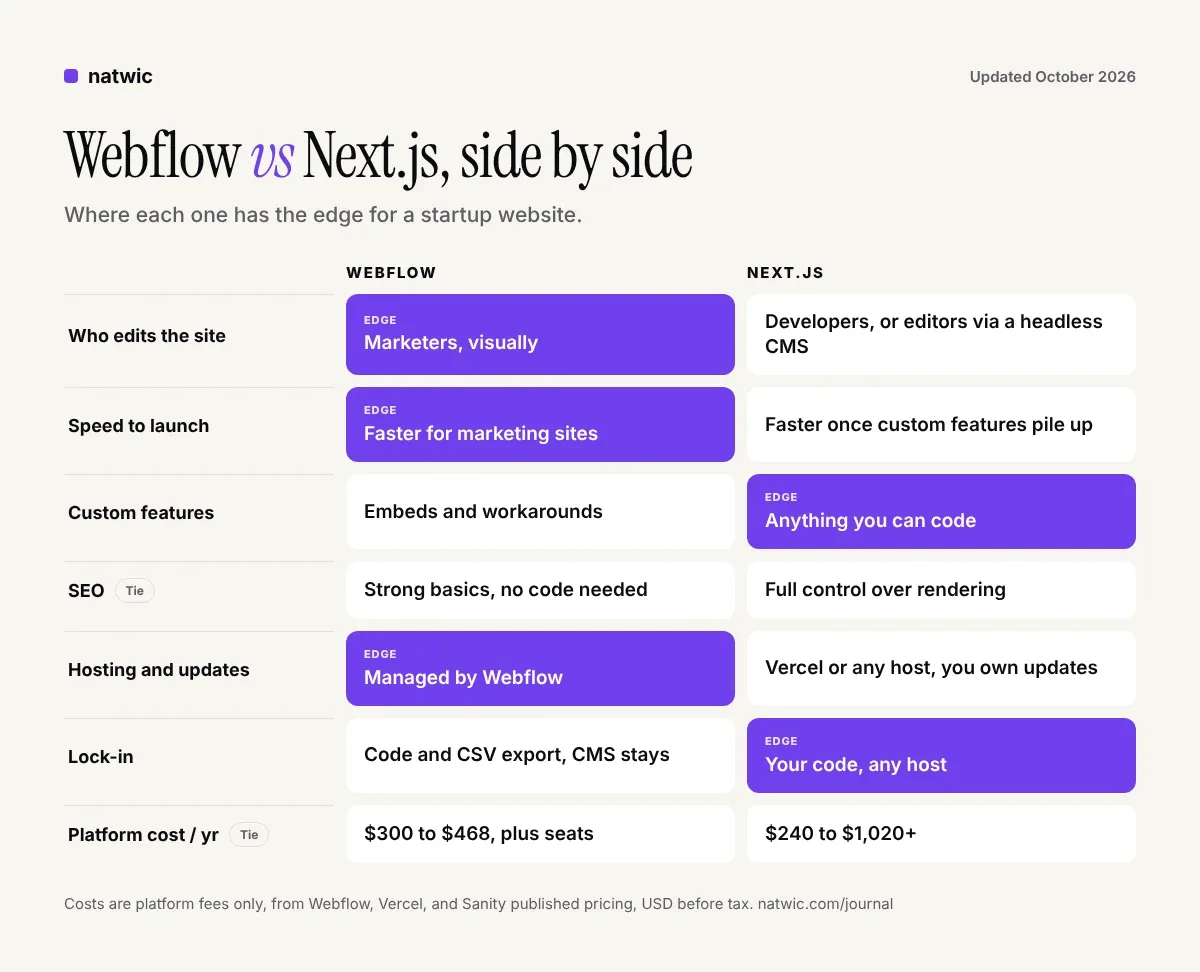
Who edits the site
Webflow wins for most startups. A marketer can duplicate a landing page, swap the copy, and publish in an afternoon. With Next.js, editors only get that freedom if a developer first builds a CMS with flexible page blocks. Without it, every headline change becomes a pull request.
Speed to launch
For a standard marketing site (home, product, pricing, about, blog, contact), Webflow is usually faster because hosting, CMS, and forms come built in. Next.js catches up once the project needs custom features you'd otherwise hack around in Webflow.
Custom features and integrations
Next.js wins clearly. Calculators with real logic, gated content tied to your user database, pages that pull live data from your product, or docs that reuse your app's components all feel natural in Next.js. Webflow supports custom code embeds, but complex logic is where it starts to feel like a workaround.
SEO and site speed
Call it a tie when either one is built well. Webflow gives you clean markup, editable meta tags, sitemaps, and 301 redirects without code. Next.js gives developers full control over rendering and metadata. In our experience, slow sites on either platform come from heavy images, piles of third-party scripts, and bloated animations, not the platform itself.
Maintenance and security
Webflow handles hosting, SSL, and platform updates for you. A Next.js site needs someone to keep dependencies current, and that's not a theoretical chore: the Next.js team shipped security releases on September 30 and October 14, 2026, per the official Next.js blog. If nobody on your team owns updates, budget for a support retainer.
Ownership and lock-in
Next.js code is yours and runs on many hosts. Webflow is more locked in, but it isn't a trap. Paid Workspace plans can export site code, and CMS Collections export as CSV. The catch is that exported sites lose CMS-driven content and working forms, so leaving Webflow means a rebuild with your content carried over, not a copy and paste.
What Webflow vs Next.js costs in 2026
Most comparison posts skip real numbers, so here they are. These are the platforms' own published prices in USD, before tax.
| | Webflow | Next.js |
|---|---|---|
| Builder or framework | Included in the site plan | Free and open source |
| Hosting | Premium site plan: $25/mo billed yearly, $39/mo billed monthly | Vercel Pro: $20 per developer seat/mo, includes $20 of usage credit |
| CMS | Included, up to 20,000 items on Premium | Sanity Free (20 seats, 10,000 documents) or Growth at $15 per seat/mo |
| Editors | Workspace seats, priced separately | Unlimited free viewer seats on Vercel Pro, editors work in the CMS |
Webflow's May 2026 update merged the old CMS and Business plans into a single Premium plan and raised its CMS limit to 20,000 items, according to Webflow's pricing update. On the Next.js side, Vercel's free Hobby plan is for personal, non-commercial use, so a startup site belongs on Pro, per Vercel's pricing page.
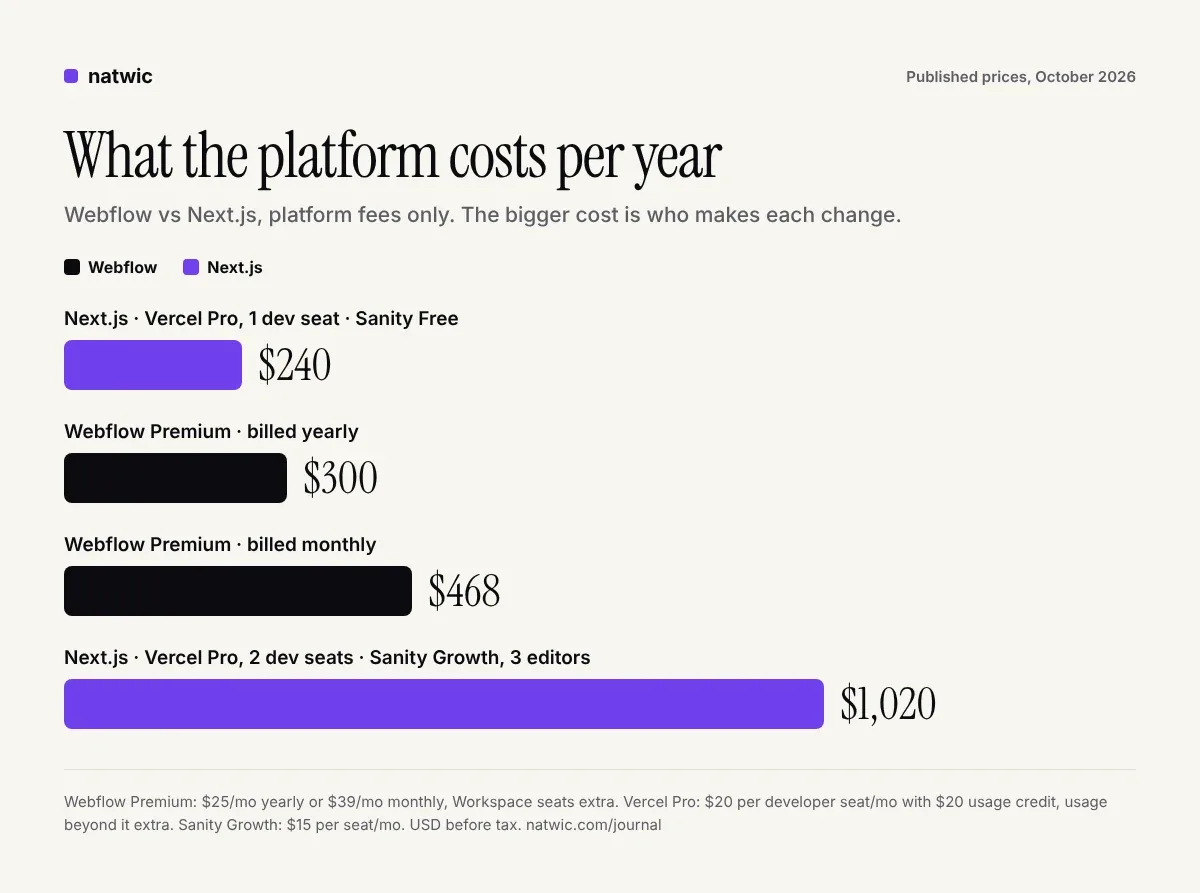
Here's what four common setups cost per year in platform fees alone:
Next.js on Vercel Pro, one developer seat, Sanity Free: $240, plus any usage beyond the included credit
Webflow Premium, billed yearly: $300, plus any Workspace seats
Webflow Premium, billed monthly: $468, plus any Workspace seats
Next.js on Vercel Pro, two developer seats, Sanity Growth for three editors: $1,020
Our take: for a startup marketing site, the platform bill is close to a rounding error. What actually moves your budget is people time. Webflow lets marketing ship without engineering. Next.js spends developer hours on every change the CMS wasn't built for, plus routine updates. When you compare quotes, price the build and the next 12 months of changes, not just the subscription.
When we recommend Webflow, Next.js, or both
This is how we make the call on real projects.
Choose Webflow when
Marketing owns the site and wants to launch new pages often
The site is mostly content: pages, a blog, case studies, careers
No developer will own the codebase after launch
You need to launch in weeks and still look sharp on day one
Choose Next.js when
The site shares components, data, or login with your product
You need custom logic like calculators, configurators, or personalized pages
You have engineers who will own the codebase long term
You plan to generate tens of thousands of pages from your own data
The hybrid we recommend to many SaaS teams
A lot of SaaS startups don't have to choose. Put the marketing site on Webflow at yourdomain.com so marketing moves fast, and keep the product in Next.js at app.yourdomain.com, where engineering already lives. A shared design system keeps the two feeling like one brand. Webflow Cloud now also hosts Next.js and Astro apps alongside a Webflow site, which is worth a look if you'd rather keep both under one roof.
The rule underneath all of this: pick the platform for the team that will maintain the site, not the team that's loudest in the kickoff call. It's the first question our Webflow and Next.js development team asks, and it shapes most of our SaaS website design projects.
Mistakes we see founders make with this decision
Choosing Next.js "because it scales." A marketing site rarely outgrows Webflow before you've raised enough money to rebuild anyway. Premium alone holds 20,000 CMS items.
Choosing Webflow and assigning no owner. Webflow is easy, not automatic. Someone still needs to own the components, structure, and SEO basics.
Building in Next.js with no CMS. It ships fast, then every edit routes through one developer who has better things to do.
Ignoring switching costs. Moving later means a rebuild plus redirects for every URL. Decide with the next 18 to 24 months in mind.
Comparing quotes for different projects. One studio quotes five pages, another quotes fifteen. A clear website design brief makes every quote cover the same scope.
Free Webflow vs Next.js decision scorecard
Answer these eight questions honestly. Count your A's and B's, and the result tells you where to start.
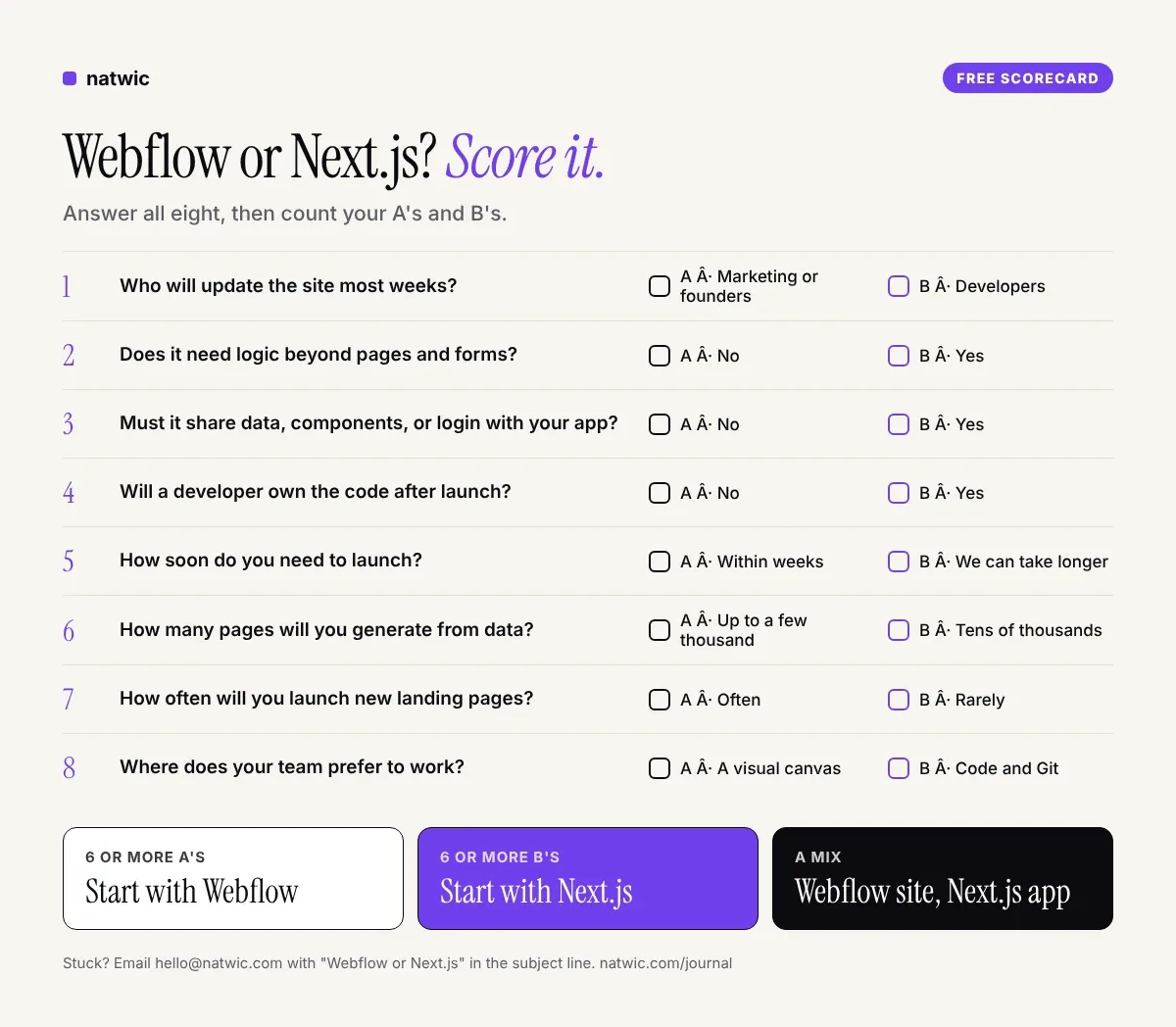
Still on the fence? Email hello@natwic.com with "Webflow or Next.js" in the subject line, plus a couple of lines on your team and what the site needs to do. We'll send back our recommendation and the reasoning behind it, for free.
FAQ
Is Webflow or Next.js better for SEO?
Neither has a built-in ranking advantage. Both can produce fast, clean, crawlable pages with proper meta tags, sitemaps, and redirects. Webflow makes the basics easier for non-developers, while Next.js gives developers finer control. Content quality and site speed matter far more than the platform.
Is Next.js free to use?
The framework itself is free and open source. You still pay for hosting, and Vercel's free Hobby plan is limited to personal, non-commercial use, so most startups pay $20 per developer seat per month on Pro. Add a headless CMS if non-developers need to edit content.
Can you migrate from Webflow to Next.js later?
Yes. You can export CMS Collections as CSV and, on paid Workspace plans, export the site code. Exported code loses CMS-driven content and form handling, though, so plan it as a rebuild with your content and URLs carried over, plus 301 redirects for anything that changes.
Can non-developers edit a Next.js website?
Yes, if it's built with a headless CMS such as Sanity and flexible page sections. Editors then change text, images, and blog posts without code. What they usually can't do is create a brand-new layout, which is where Webflow is stronger.
Is Webflow good enough for a SaaS website?
For the marketing site, usually yes. Homepage, pricing, features, blog, changelog, and careers pages all fit Webflow well. Keep the product itself, with logins and app logic, in a framework like Next.js.
Which is faster to build, Webflow or Next.js?
For a standard marketing site, Webflow is usually faster because hosting, CMS, and forms are built in. Next.js projects take longer up front but can be faster when the site needs custom features. Content and approvals often slow either one down more than the build.
Making the Webflow vs Next.js call with confidence
The Webflow vs Next.js decision is less about technology than about your team. If marketing runs the site, start with Webflow. If the site is part of the product, start with Next.js. If you're a SaaS team with both needs, split them and stop arguing.
Want a straight answer for your situation? Tell us about your team and what the site has to do through natwic.com/contact or at hello@natwic.com. We reply within one working day with the platform we'd pick and why.
Related services
Need a hand with this?
Related posts
More from the journal.
9 min read
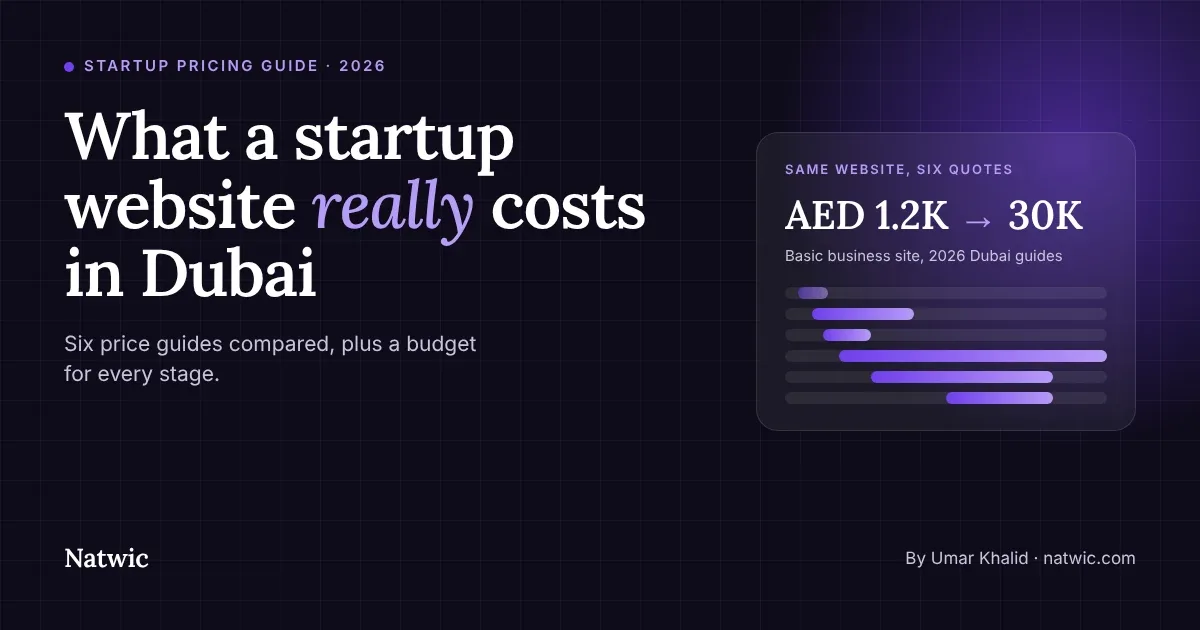
Startup Website Cost in Dubai: What to Budget in 2026
What does a startup website cost in Dubai? We compared six 2026 price guides and mapped what to spend at each stage, plus the costs quotes leave out.
8 min read
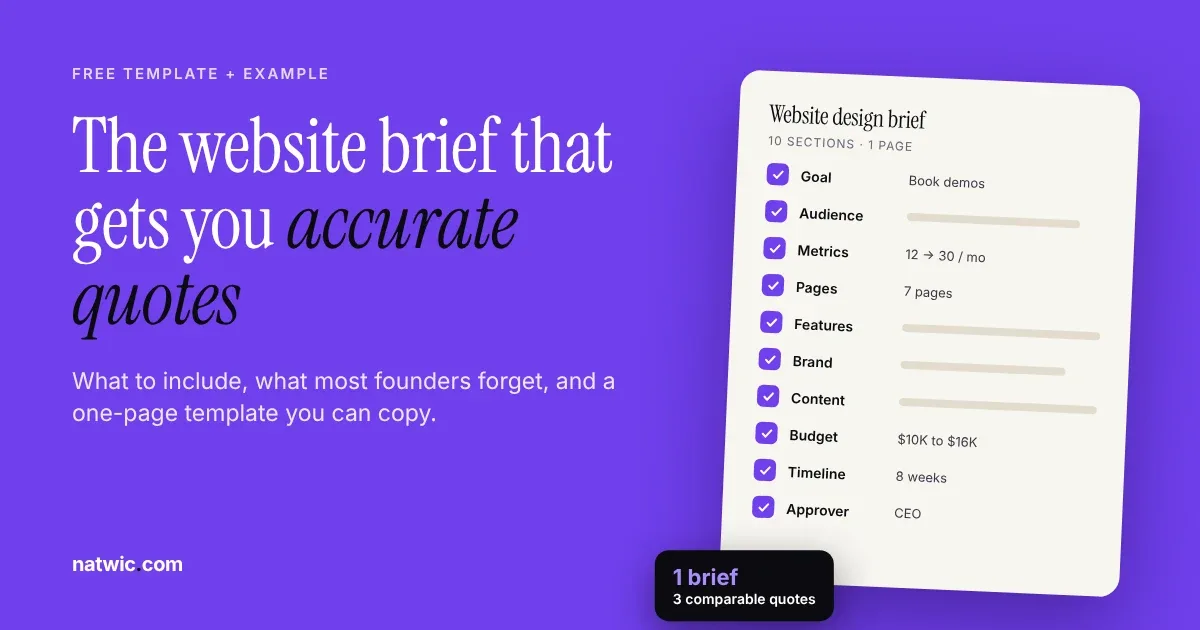
Website Design Brief: Free Template and Filled Example
Write a website design brief that gets accurate quotes: the 10 sections to include, a filled-in SaaS example, and a free one-page template to copy.

9 min read
Bilingual Website Design UAE: Arabic and English Done Right
Bilingual website design in the UAE, explained for startups: when you need Arabic, the RTL rules to get right, SEO setup, and a free 12-point checklist.
Want us to build something like this for you?
Start a project→