16 min read
Startup Website Design: The Complete 2026 Guide
Startup website design, start to finish: pages by stage, homepage structure, 2026 costs and timelines, platform picks, and a free launch checklist.
Your startup website usually gets one visit to convince a stranger that your product is real, worth their time, and built by people who know what they're doing. Most early sites fail that test for boring reasons: a vague headline, a homepage that reads like a feature list, and a button that asks for too much too soon.
This is the startup website design guide we wish every founder read before their kickoff call. We've rebuilt enough startup sites at Natwic to know where they go wrong, so here's what to build, what it costs in 2026, and the mistakes we fix most. There's a free launch checklist near the end.
The short answer: what good startup website design looks like
Good startup website design explains what you do in one headline, proves it with real product visuals and honest proof, and asks for one clear next step. Most early-stage startups need 5 to 8 pages. A custom marketing site typically costs $5,000 to $20,000 and launches in 2 to 8 weeks.
What a startup website actually has to do
A startup site isn't a brochure. It does three jobs at once, often for three audiences: customers, investors, and future hires.
Explain: a stranger should be able to repeat what you do after one scroll.
Prove: product screenshots, a demo, customer logos, usage numbers, or founder credibility that make the claim believable.
Convert: one primary action that matches your stage, like joining a waitlist, booking a demo, or starting a trial.
Our take: pick one primary action per stage and design everything around it. When a homepage gives "Book a demo," "Start free," "Join our newsletter," and "Contact sales" equal weight, visitors usually pick none of them.
You can see this in our own client work. Breakthirty's site is built to turn visitors into audit requests, and Cayano's property site centers on a single "Book a Valuation" button. One job, one button, repeated wherever it makes sense.
Which pages a startup website needs at each stage
Page count is where scopes quietly balloon. Here's how we scope a startup site by stage.
| Stage | Pages | Primary action | Typical timeline |
|---|---|---|---|
| Validating | 1 landing page | Join the waitlist | 1 to 2 weeks |
| Launching | 5 to 8 pages | Book a demo or start a trial | 2 to 8 weeks |
| Scaling | 10 to 30+ pages on a CMS | Demo, trial, or talk to sales | 6 weeks or more |
Validating: one landing page
Before launch, you need a single page with a sharp headline, three or four benefit sections, a product preview, and a waitlist or early access form. That's it.
Your job at this stage is to learn which message gets signups, not to impress anyone with a mega menu. A one-page site is also easy to rewrite when that message changes, and it will.
Launching: 5 to 8 pages
Once you're selling, the core set is Home, Product (or How it works), Pricing, About, and Contact or Book a demo, plus Privacy and Terms. That covers what most buyers check before they talk to you.
Add a blog only if someone will actually publish on it. An empty blog with two posts from launch week does more harm than no blog at all.
Scaling: add pages that earn their place
After funding and a first sales hire, add use-case or industry pages, integrations, case studies, careers, a changelog, and comparison pages. Each new page should answer a real search query or a real sales question.
If a page does neither, it's maintenance with no payoff. We'd rather see 12 pages that each do a job than 40 that nobody updates.
Signs you've outgrown your first site
In our experience, most startups rebuild their site at least once, usually somewhere between the seed round and the first serious sales push. These are the signals we watch for:
Your positioning changed, but the homepage still describes the product you had a year ago.
Your sales team sends prospects decks and PDFs because the site doesn't answer their questions.
Every new landing page needs a developer, so marketing stops shipping them.
The site looks noticeably less polished than the product, or than the competitors your buyers compare you with.
You can't tell which pages bring in demos or signups, because tracking was never set up properly.
If two or more of these sound familiar, a redesign will usually pay for itself faster than another round of small fixes. Start with the message and the sitemap, not the visuals.
How to structure a startup homepage
The homepage gets most of your traffic and most of the scrutiny. Here's the order we start from on most startup and SaaS projects, then adjust once we know the buyer.
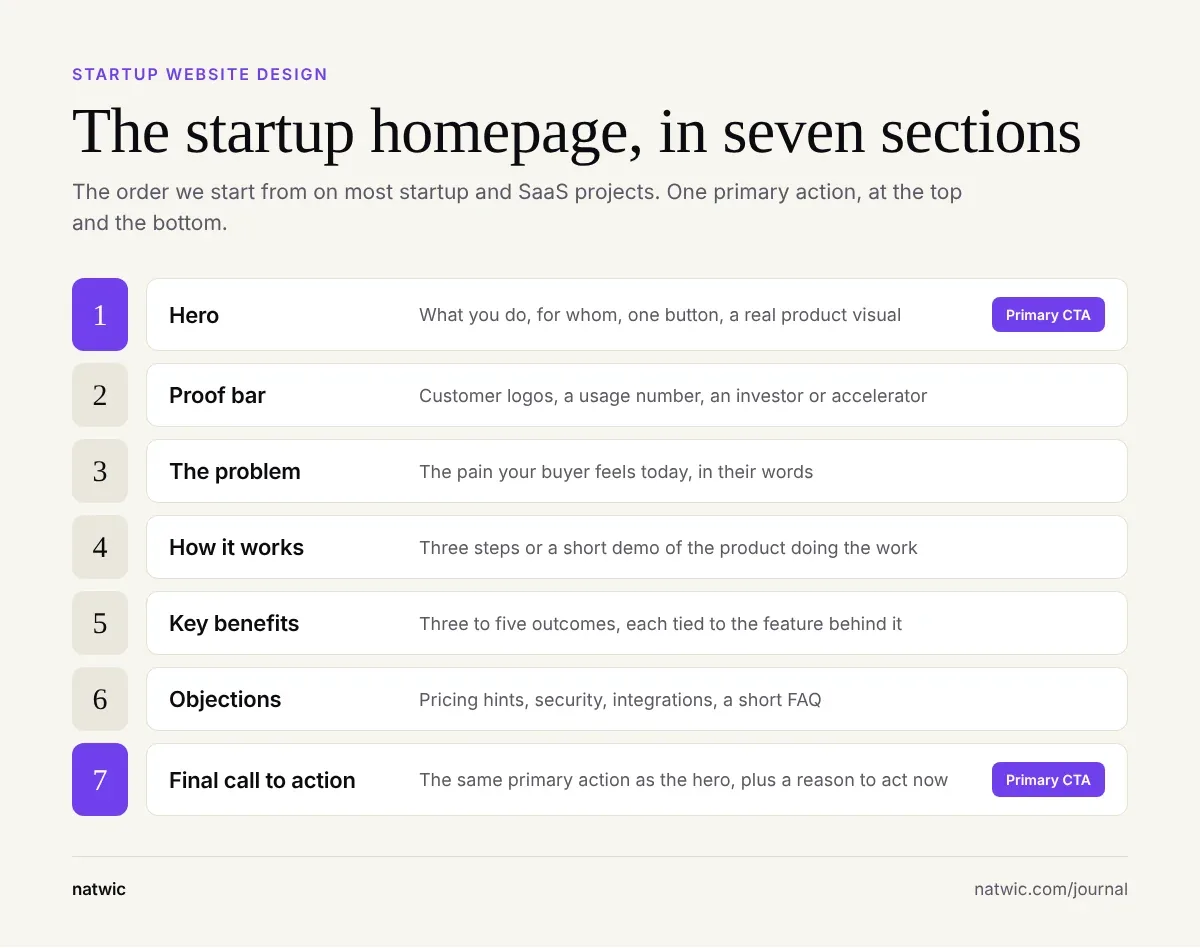
Hero: a headline that says what you do and for whom, one supporting line, one primary button, and a real product visual.
Proof bar: customer logos, a usage number, or a recognizable investor or accelerator, if you have them.
The problem: the pain your buyer feels today, in their words, not yours.
How it works: three steps or a short demo, ideally showing the product doing the work.
Key benefits: three to five outcomes, each tied to the feature that delivers it.
Objections: pricing hints, security, integrations, and a short FAQ.
Final call to action: the same primary action as the hero, restated with a reason to act now.
When we rebuilt the website for Juno, an AI chief of staff, we restructured the homepage into six story beats: the customer's pain, Juno as the answer, a demo of working features, integrations, a demo-style FAQ, and a closing call to action. "AI assistant" is a crowded, vague category, so the page had to show the product working instead of describing it.
The full story, including the design system behind it, is in our AI SaaS website design case study on Juno.
Write the message before you design anything
Most startup website problems are really copy problems wearing a nice font. If the headline is vague, no layout will save it.
A hero formula that works for most B2B startups: what you do, who it's for, and the outcome they get. Here are two rewrites in the style we use on projects (the companies are made up):
| Vague | Clear |
|---|---|
| The future of team productivity | Meeting notes that turn into assigned tasks, for remote product teams |
| Powering smarter finance | Close your monthly books in days, not weeks, built for Series A finance teams |
Test your headline on someone outside your industry. If they can't tell you what you sell after reading it once, rewrite it before you brief a designer.
We also recommend drafting real copy for the hero and the first three sections before design starts. Designing around placeholder text hides weak messaging until it's expensive to fix.
Startup website design principles that matter most
Design a system, not a pile of pages
Startups add pages constantly. If every page is a one-off, each new page costs nearly as much as the first.
Design a small kit of reusable sections instead: hero, feature row, testimonial, pricing card, FAQ, and call-to-action band, all sharing the same type, color, and spacing rules. Your team can then build new pages from parts.
On Juno, we wrote tone and design guidelines first, designed the homepage next, then applied the system to every other page. That order is a big reason nine pages could be rebuilt in one week.
Design mobile first
Plenty of first visits come from links people tap on their phones: LinkedIn posts, X threads, group chats, and email. Design the mobile hero first.
If the headline, product visual, and button don't fit on a phone's first screen, the desktop version is probably hiding the same problem behind extra space.
Show the real product
Screenshots, short looping clips, or interactive demos beat abstract 3D shapes. Buyers want to see what they'll actually use.
If your UI isn't ready yet, show a focused mockup of the core workflow, not a generic dashboard with random charts. One clear screen beats five busy ones.
Keep proof honest
Early startups rarely have big logos. Use what's true: pilot customers, a short quote from a design partner, beta usage numbers, founder background, or an accelerator.
On Juno, we designed the logo and testimonial slots with placeholders so the page structure didn't have to wait for final content. Placeholders are a build tool. Before launch, swap in real proof or remove the slot.
Make the pricing page do real work
For B2B startups, the pricing page is one of the first places serious buyers click, because it tells them fast if you're in their range. Even if you sell on custom quotes, publish something: a starting price, what each plan includes, or the factors that drive the price.
A page that only says "Contact us" makes buyers do the work of guessing, and many won't bother. Pair your plans with a short FAQ that answers billing, contracts, and security questions, so the sales call starts further along.
Build accessibility in from day one
Aim for WCAG 2.2 Level AA: normal body text needs a contrast ratio of at least 4.5:1, images need alt text, and the whole site should work with a keyboard.
It's far cheaper to design this in than to retrofit it later. Light gray text on white is the most common failure we catch in startup design reviews.
Speed, SEO, and AI search basics to get right at launch
A beautiful site that loads slowly or can't be found is a very expensive screenshot. These are the basics we set up before any launch.
Hit the Core Web Vitals targets
Google's Core Web Vitals measure loading, responsiveness, and visual stability. The "good" targets are Largest Contentful Paint of 2.5 seconds or less, Interaction to Next Paint of 200 milliseconds or less, and Cumulative Layout Shift of 0.1 or less, measured at the 75th percentile of page loads, per web.dev.
In our experience, the usual culprits on startup sites are oversized hero videos, uncompressed images, piles of third-party scripts (chat widgets, trackers, heatmaps), and heavy animation libraries. Compress images to WebP, lazy-load anything below the fold, and cut every script you can't justify.
Cover the SEO basics
A unique title and meta description on every page
One H1 per page, with a clear H2 structure under it
Short, readable URLs you won't need to change later
An XML sitemap submitted to Google Search Console
301 redirects for every old URL if you're replacing an existing site
Internal links between related pages, so search engines and visitors can find them
Get ready for AI search
Founders now ask us how to show up in Google's AI Overviews and in ChatGPT answers. Google's own guidance is that there are no additional requirements to appear in AI Overviews or AI Mode beyond normal SEO best practices, according to its AI features documentation.
So the practical move is clear writing. Answer real buyer questions directly, use specific numbers, and keep important content in text, not baked into images.
Choosing a platform for your startup website
The platform matters less than who will maintain the site after launch. Here's how we think about the main options.
Webflow: best when marketing owns the site and wants to publish pages without developers. Hosting, CMS, and forms are built in.
Next.js: best when the site shares components, data, or logins with your product, and you have engineers who will own the code.
Framer: quick for small, design-led sites and landing pages, with a visual editor that non-developers pick up fast.
WordPress: a huge plugin ecosystem, but it needs regular updates and security care, so give it a clear owner.
Many SaaS teams run two: a Webflow marketing site at yourdomain.com and a Next.js app at app.yourdomain.com, tied together by one design system. We break down the trade-offs and the 2026 platform fees in our Webflow vs Next.js comparison for startups.
If you sell in the Gulf, plan for Arabic from the start. Right-to-left layouts change navigation, icons, and typography, and retrofitting them is painful. Our guide to bilingual website design in the UAE covers how to do it properly.
What startup website design costs in 2026
Published 2026 price guides put a startup website anywhere from a DIY builder plan of about $12 a month to $75,000 or more for a complex product platform. Here's how those ranges line up when we sort them by stage.
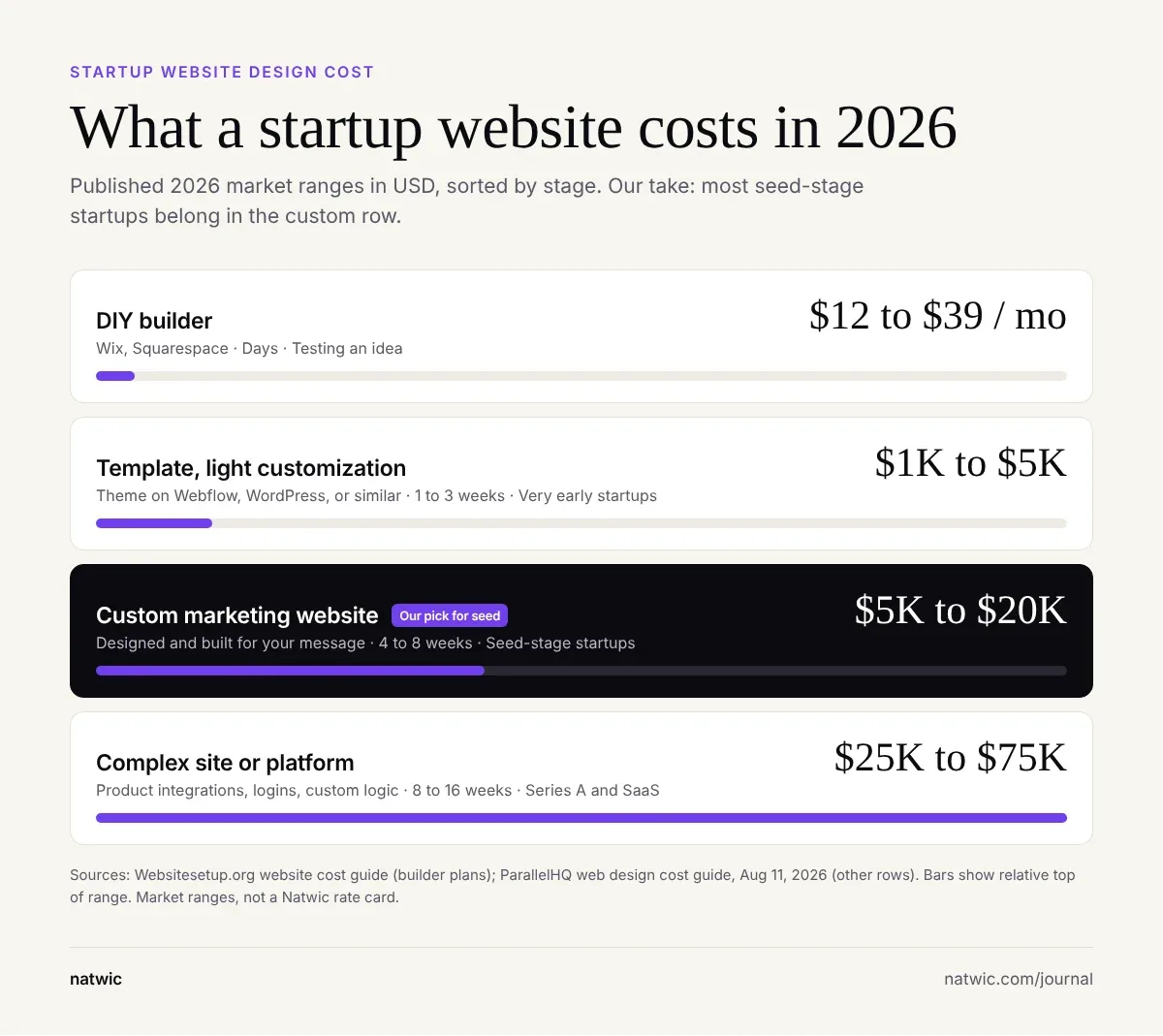
| Option | Published 2026 range (USD) | Typical timeline | Best for |
|---|---|---|---|
| DIY builder (Wix, Squarespace) | About $12 to $39 a month in plan fees | Days | Testing an idea |
| Template with light customization | $1,000 to $5,000 | 1 to 3 weeks | Very early startups |
| Custom marketing website | $5,000 to $20,000 | 4 to 8 weeks | Seed-stage startups |
| Complex site or platform | $25,000 to $75,000 | 8 to 16 weeks | Series A and SaaS with product integrations |
The builder plan prices come from Websitesetup.org's website cost guide. The other three rows come from ParallelHQ's web design cost guide, published August 11, 2026. These are market ranges, not our rate card: we quote a fixed price once the scope is agreed.
Our take: most seed-stage startups belong in the custom marketing site row. A template is fine while you validate, but once you're raising or selling, a site that looks like everyone else's costs you credibility that never shows up in a spreadsheet.
Costs that rarely show up in the quote
Platform and hosting fees, which our Webflow vs Next.js post prices out for 2026.
Copywriting, if the studio only offers "copy direction" rather than full copy.
Brand identity, if you don't have one yet. Our startup branding cost breakdown shows what that adds.
Stock photography, icons, and font licenses.
Post-launch changes, new pages, and maintenance.
Budgeting in AED? Our startup website cost guide for Dubai breaks down UAE pricing, VAT, and the cost of adding Arabic.
How long startup website design takes, and the process we use
Most marketing sites we build run in focused sprints of two to four weeks, faster than the 4 to 8 weeks the published guides quote for custom sites, because we agree the sitemap, page content, and scope before design starts. Larger sites with many page types or custom features take longer, and we agree the timeline during planning.
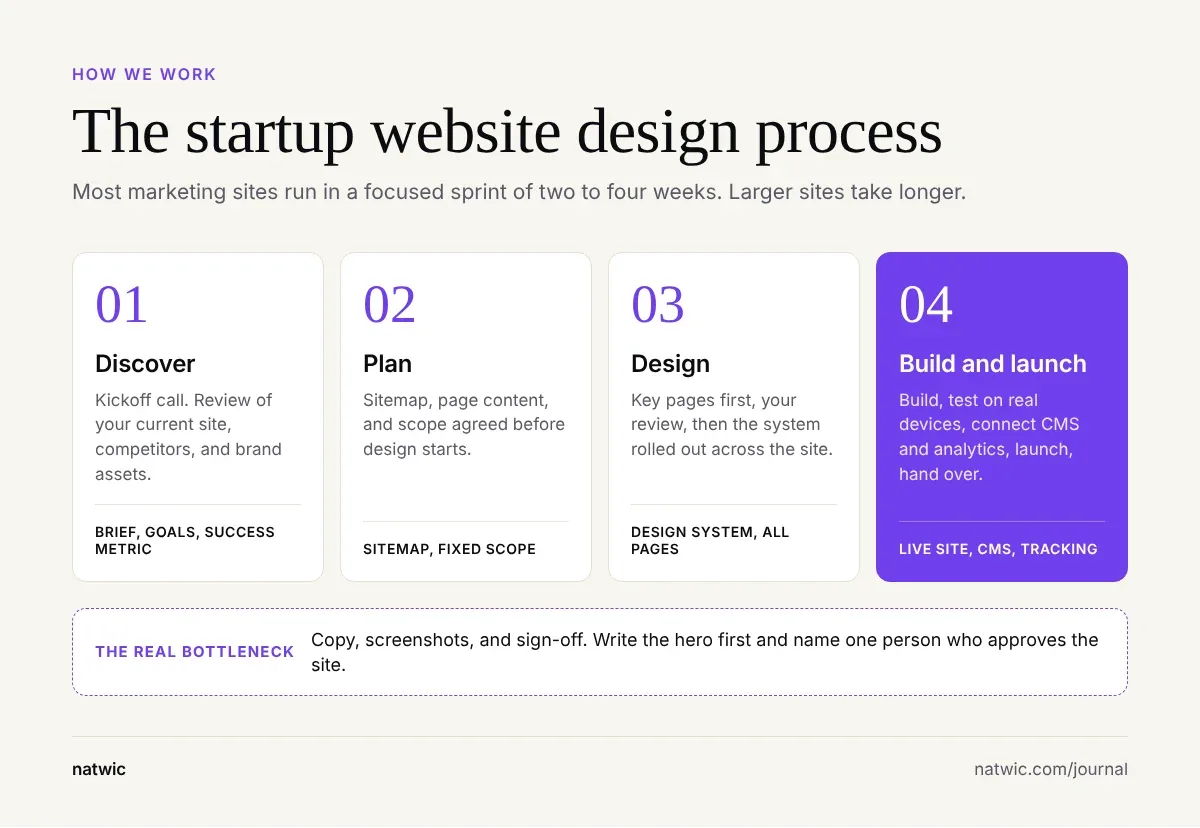
Here's what happens at each step of a Natwic project:
Discover: a kickoff call and a review of your current site, competitors, and brand assets.
Plan: we agree on the sitemap, page content, and scope before design starts, so the quote doesn't drift.
Design: key pages first, your review, then the system rolled out across the whole site.
Build and launch: we build, test on real devices, connect the CMS and analytics, launch, and hand over.
Content is the real bottleneck. In our experience, sites rarely run late because of design or development. They run late because copy, screenshots, and sign-off from a busy founder arrive after the build is ready.
Two habits speed everything up. First, write a clear brief: our free website design brief template makes every studio quote the same scope. Second, name one person who approves the site, so feedback doesn't arrive by committee.
That's how our web design for startups projects run, from positioning and copy direction through CMS setup and a short post-launch support period. You talk directly to the designers and developers doing the work, with no account managers in between.
Startup website design mistakes we see most often
These come up in almost every audit we run on an early-stage site.
Designing before the message is clear. Pretty layouts around a vague headline still convert like a vague headline.
Too many calls to action. One primary action per page, repeated, beats five competing buttons.
Feature lists instead of outcomes. "AI-powered tagging" means less to a buyer than "find any file in seconds."
Building pages nobody needs. A 20-page sitemap at launch usually means 12 pages nobody maintains.
Launching without tracking. Set up analytics and key events (demo booked, trial started, waitlist joined) before launch, or you can't tell what's working.
No owner after launch. Pick a platform your team can actually update, and name the person who will.
Leaving mobile until the end. Most of the layout problems we fix only show up on a phone.
Free startup website launch checklist
Run your site through these 15 checks before you go live. If you can't tick one, fix it first or write down when you will.
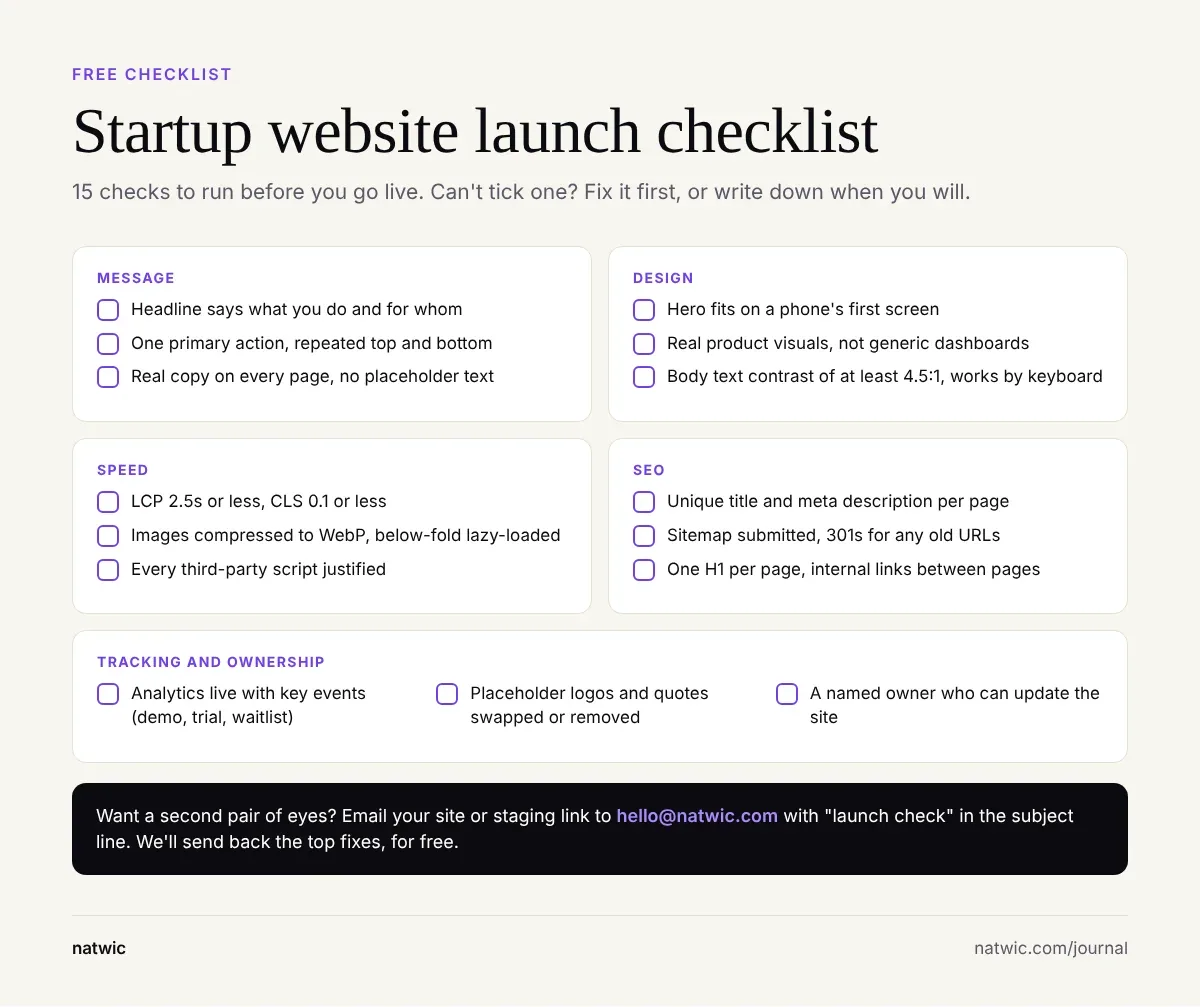
Want a second pair of eyes? Email your site or staging link to hello@natwic.com with "launch check" in the subject line. We'll send back the top fixes we'd make before you go live, for free.
FAQ
How many pages does a startup website need?
A pre-launch startup can validate with one landing page. Once you're selling, most startups need 5 to 8 pages: Home, Product, Pricing, About, and Contact or Book a demo, plus Privacy and Terms. Add use-case pages, case studies, and a blog as you grow and have content to fill them.
How much does a startup website cost?
Published 2026 guides put a template-based site at about $1,000 to $5,000 and a custom marketing website at $5,000 to $20,000. Complex sites with product integrations run $25,000 to $75,000 or more. Plan for platform fees, copy, and post-launch updates on top.
How long does it take to design a startup website?
A single landing page can launch in one to two weeks. Most custom marketing sites take two to eight weeks, depending on page count and how ready your content is. Late copy and slow approvals cause more delays than design or development.
Should a startup use a template or a custom design?
A template is fine while you're validating an idea and need to move fast on a small budget. Once you're raising money or selling to businesses, a custom design helps you look credible and different from competitors using the same theme. Many teams start on a template and move to custom around their seed round.
Do you need a brand identity before designing a website?
It helps, but it isn't required. A designer can work from an existing logo and colors, create a lightweight identity alongside the site, or run a full branding project first. Building the site before any brand exists usually means redoing parts of it later.
What should be on a startup homepage?
Start with a hero that says what you do and for whom, then a proof bar, the problem, how it works, key benefits, objections, and a final call to action. Show the real product wherever you can. Keep one primary action and repeat it at the top and bottom of the page.
Getting your startup website design right the first time
Getting startup website design right comes down to a clear message, the right pages for your stage, a homepage that shows the product working, and a site your team can update the week after launch.
Planning a new site or outgrowing your first one? Tell us your stage, your launch date, and what the site needs to do through natwic.com/contact or at hello@natwic.com. We reply within one working day with a recommended sitemap, a timeline, and a fixed-price proposal.
Related services
Need a hand with this?
Related posts
More from the journal.
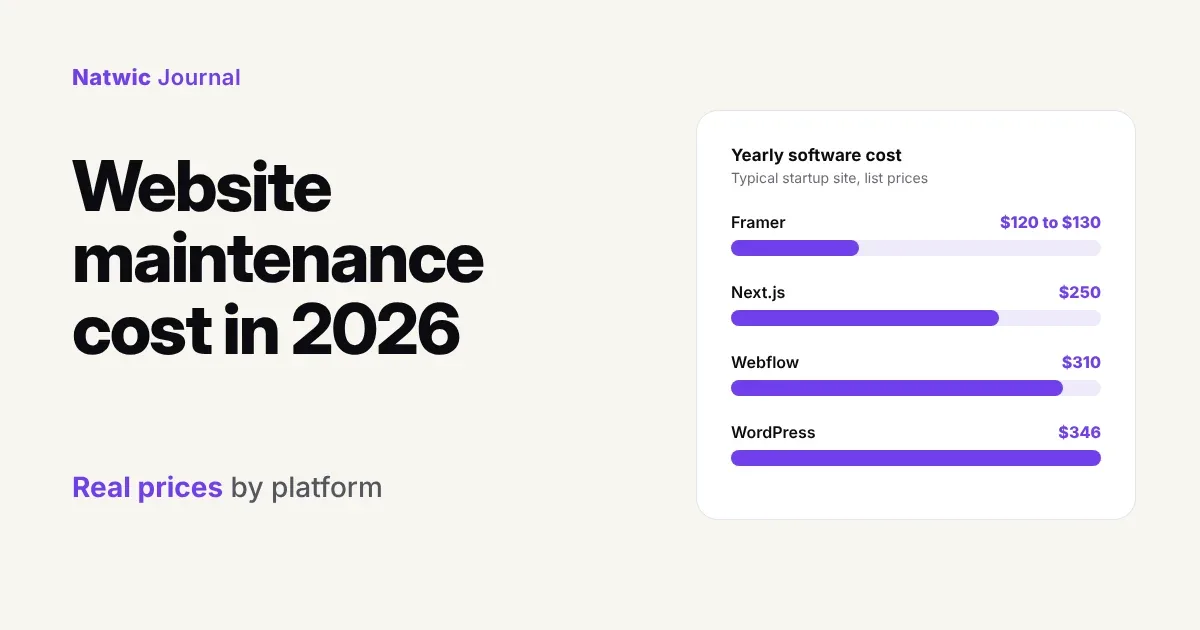
7 min read
Website Maintenance Cost in 2026: Real Prices by Platform
Website maintenance cost in 2026, priced line by line for Webflow, Framer, WordPress, and Next.js, plus what the big guides miss and a free checklist.
8 min read
Webflow vs Next.js for Startups: Which to Pick in 2026
Webflow vs Next.js for your startup site: a side-by-side comparison, real 2026 platform costs, when to use both, and a free scorecard to decide.
9 min read
Startup Website Cost in Dubai: What to Budget in 2026
What does a startup website cost in Dubai? We compared six 2026 price guides and mapped what to spend at each stage, plus the costs quotes leave out.
Want us to build something like this for you?
Start a project→